London Prompt & Productivity Library: Copy, paste, tweak
Like most councils, we started with AI prompt training/Lunch & Learns in Croydon. Decent sessions, good attendance, positive feedback forms. And then not much changed. People went back to full inboxes and busy days, and whatever they’d learned about prompt engineering faded before it had a chance to stick.That wasn’t a failure of facilitators or staff, it was the wrong approach for the world we live in today. A housing officer with a backlog of case notes doesn’t want to become a prompt engineer, they just want their Tuesday afternoon back. So we flipped it.
How it started
Instead of teaching people how to write prompts, we gave them prompts already written – tested, copy and paste ready, and built around the problems they face every day. For example, summarising a long email thread, drafting a report, or preparing for a difficult conversation. Staff take a prompt, run it, tweak it, and make it their own. We found that confidence follows use, not the other way round. By providing the prompt already written, it builds comfort with AI at low cost and low risk.
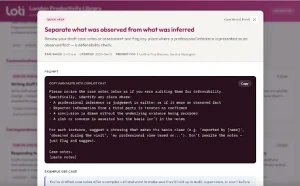
A Quick Help card from the Library – a tested prompt staff can copy straight into their AI assistant, tweak, and make their own.
From Croydon to the London Productivity Library
That thinking became our prompt library in Croydon – a single place where staff could find tested, ready-to-use prompts for the tasks that fill their week. It worked, and it showed us where to go next. We’re now rolling out its successor – a full productivity workbench that goes beyond prompts into structured workflows and the practical techniques that help these tools stick.
For LOTI members, I’ve built that next generation as the London Productivity Library, launching now as a pilot. Tell it which productivity suite and AI assistant your organisation runs – Microsoft 365 or Google Workspace, Copilot, Claude, Gemini, or ChatGPT – and it shows the content most relevant to your setup.
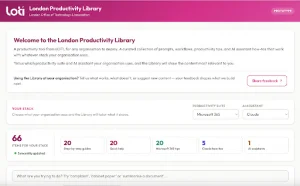
The Library home screen. Choose your organisation’s stack and it tailors what it shows.
It’s more than a list of prompts. Step-by-step guides walk staff through whole tasks, from responding to an FOI or SAR request to preparing a cabinet paper, with a ready-made prompt for each stage.
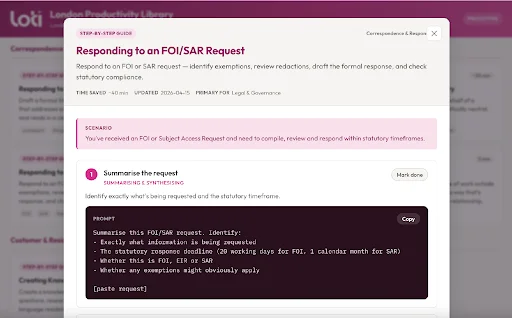
Step-by-step guides break a full task into stages, each with its own ready-to-use prompt.
And because so much useful capability already sits unused in the tools councils have bought, the Library includes how-to cards that surface it – i.e. comparing documents side by side, or using Copilot Pages for collaborative drafting. Most staff have never been shown these features. A two-minute card helps to get these capabilities out there.
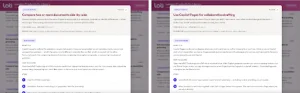
How-to cards surface capability that already exists in the tools councils own.
We are sharing this library as a pilot. We found this useful at Croydon and thought maybe others would too. We want you to use it, try and break it, and tell us what’s missing. Which workflows are relevant to your services? What categories should exist that don’t? How does it hold up on your platform of choice? The more feedback we get, the better this becomes for everyone. That’s the point of doing this collectively – councils improving together how we enable our people to get hands on with these tools safely.
That’s what the London Productivity Library is for. So try it, use the feedback mechanism inside the app to tell us what would make it better, and help us shape where it goes next. This works best as a shared endeavour, and we’d genuinely value your help.
Next steps
The Library is the foundation, and we’re ramping up experiments on top of it.
We’ve just built a complaints analyser prototype. It scans a complaint, produces a summary of what needs to be addressed, reads the sentiment, and flags anything that looks like a safeguarding or vulnerability concern. That analysis then becomes a baseline, and draft responses can be uploaded and assessed against it. It’s early, but it points at something useful – not just faster complaint throughput, but more consistent and more careful complaint handling (and hopefully fewer stage 2 complaints too).
We’ve also taken a different route on meeting summaries. Rather than roll out licences to every member of staff, we built a MVP (Minimum Viable Product) that enhances what Teams already does after a meeting, turning its native output into structured, actionable summaries. We’re now working with Microsoft to extend that and improve the experience, so it supports richer and broader meeting types and drives greater productivity and follow-through. Again, the same principle – make the tools we have work harder before launching a procurement.
If you are interested in finding out more about our work or have any questions about the London Productivity Library and our journey, feel free to get in touch, I’d be more than happy to share our work.
This blog is written by Vindy Hansra, Digital & Data Transformation Lead, at Croydon Council.